


Download Allmyapps – Free Windows App Manager for Easy Software Updates & Organization
Tired of juggling dozens of installed applications on your Windows PC? Allmyapps is a powerful, free desktop tool designed to help you manage, organize, and keep all your software up to date. Whether you're a casual user or a power user with a cluttered software library, Allmyapps simplifies the process of tracking installed programs and identifying outdated ones. With seamless integration across devices and secure cloud synchronization, this app ensures your Windows system stays clean, efficient, and secure. Download Allmyapps today and take full control of your software ecosystem.
Key Features of Allmyapps
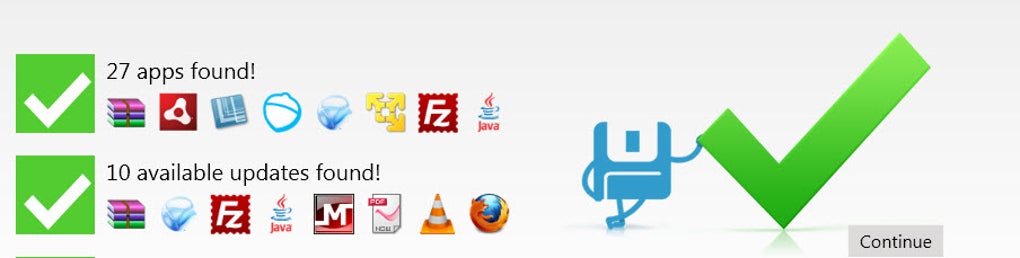
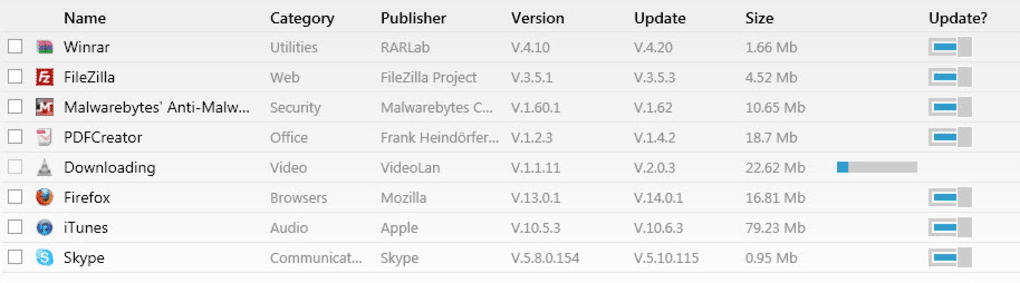
Allmyapps stands out in the crowded field of software management tools by offering a comprehensive suite of features tailored to modern Windows users. One of its most valuable features is the automatic update detection system. Once you install the app and sign in with your account, Allmyapps scans your entire system and identifies every installed application—along with their current versions. It then cross-references these with the latest available versions from official sources, flagging any outdated software. This proactive approach helps prevent security vulnerabilities and performance issues caused by outdated programs. Another standout feature is the centralized app dashboard. Instead of hunting through Start menus or Control Panel, you can view all your installed apps in one clean, organized interface. The dashboard includes details like installation date, size, publisher, and update status—making it easy to identify unused or redundant software. You can also filter apps by category, such as productivity, media, or development tools, which is especially helpful for users managing large software libraries. The built-in app search and download functionality is a game-changer. Rather than leaving your browser to search for new software, Allmyapps allows you to browse and install new applications directly from its library. This feature saves time and reduces the risk of downloading malicious software from untrusted websites. Plus, all installations are logged and managed through the same interface, keeping your system organized from day one. Allmyapps also supports cloud synchronization, meaning your app list stays consistent across multiple devices. Whether you're using your desktop at work or your laptop at home, your software inventory is always up to date. With secure login options via Facebook, Gmail, or a dedicated account, your data remains private and protected. These features make Allmyapps more than just a tool—it’s a complete software ecosystem manager for Windows users.How to Install and Use Allmyapps on Your Windows PC
Getting started with Allmyapps is quick and straightforward. Begin by visiting the official Allmyapps website and downloading the installer for your system. The download is completely free and available for Windows 7, 8, 10, and 11. Once downloaded, run the installer and follow the on-screen prompts. The installation process is lightweight and typically takes less than a minute. After installation, launch the app. You’ll be prompted to create a new account or sign in using your Google, Facebook, or Twitter credentials. This step is essential to unlock full functionality, including cloud sync and update tracking. Once signed in, Allmyapps will automatically scan your system and build a detailed inventory of all installed applications. This scan may take a few minutes depending on the number of programs installed. Once the scan completes, you’ll see your app list in the dashboard. Here, you can sort apps by name, size, installation date, or update status. To check for updates, simply click the “Check for Updates” button. Allmyapps will then compare your installed versions with the latest releases and display a list of outdated software. To update an app, select it and click “Update.” The tool handles the download and installation process automatically—no need to visit external websites or deal with complex setup files. For users who want to install new software, use the search bar at the top of the dashboard. Enter the name of the app you’re looking for, and Allmyapps will show relevant results with official download links. Click “Install,” and the app will be added to your system and your central inventory. The entire process is secure, fast, and user-friendly—ideal for both beginners and advanced users.Compatibility & System Requirements
Allmyapps is designed specifically for Windows users and supports the following operating systems: Windows 7, Windows 8, Windows 8.1, Windows 10, and Windows 11. It’s compatible with both 32-bit and 64-bit architectures, ensuring broad accessibility across older and newer hardware. The software is lightweight, requiring only a minimal amount of RAM and disk space—making it suitable for systems with limited resources. The app runs in the background and uses minimal CPU and memory during idle periods, so it won’t slow down your computer. It also integrates smoothly with Windows’ built-in security features, including Windows Defender and UAC (User Account Control), ensuring that all updates and installations are performed securely. While Allmyapps is currently only available for Windows, the company has hinted at future support for Mac and Linux in upcoming releases. For now, users on mobile platforms can access their app inventory via the web portal or mobile-friendly browser interface, though full functionality is best experienced on desktop. Allmyapps does not require admin rights for basic usage, though certain updates may prompt elevation requests—this is normal and expected for system-level software. The app also works well in corporate environments, provided users have access to the internet and the necessary permissions to install software. For users who rely on multiple devices, the cloud sync feature ensures that your app list remains consistent across all machines. This is especially useful for remote workers, students, and IT professionals managing several systems.Pros and Cons of Allmyapps
- Pros:
- Free to download and use with no hidden costs
- Automatically detects outdated software and provides one-click updates
- Centralized dashboard for managing all installed apps
- Secure cloud synchronization across devices
- Built-in app search and direct installation from trusted sources
- Supports multiple sign-in options (Google, Facebook, Twitter)
- Lightweight and low system resource usage
- Cons:
- Occasional crashes during update processes (minor stability issues)
- Currently limited to Windows only (no native Mac or Linux support)
- Some users report delays in detecting new app versions
- Requires internet connection for full functionality
- Advanced features are tied to account creation (not fully usable without login)
Final Verdict: Is Allmyapps Worth It?
Allmyapps delivers on its promise to simplify software management on Windows. For users overwhelmed by a cluttered Start menu or a forgotten list of installed programs, this tool is a lifesaver. Its ability to scan, track, and update software automatically saves hours of manual work and enhances system security by reducing the risk of outdated software exploits.
While the occasional crash during updates is a minor drawback, it hasn’t significantly impacted the overall user experience for most. The benefits far outweigh the cons, especially considering the app is completely free and packed with powerful features. Whether you're a home user, student, or IT administrator, Allmyapps helps maintain a clean, efficient, and secure Windows environment.
The integration of cloud sync and app search makes it more than just a utility—it’s a digital software library. The clean interface, fast performance, and intuitive design ensure a smooth learning curve for all skill levels.
If you’re looking for a reliable, secure, and easy-to-use way to manage your Windows apps, download Allmyapps today and enjoy a smarter, more organized computing experience.
FAQ – Frequently Asked Questions
-
Is Allmyapps free to download and use?
Yes, Allmyapps is completely free to download and use. There are no subscription fees or hidden charges. The core features—app scanning, update detection, and cloud sync—are available at no cost.
-
Can I use Allmyapps on Mac or Linux?
Currently, Allmyapps is only available for Windows. However, the developers have confirmed plans to release versions for Mac and Linux in the near future.
-
Do I need to create an account to use Allmyapps?
Yes, while you can run the app without an account, full functionality—including cloud sync, update tracking, and app search—requires registration or login via Google, Facebook, or Twitter.
-
How secure is Allmyapps?
Allmyapps uses secure login methods and encrypts your data during transmission. All updates are pulled from official sources, minimizing the risk of malware. The app also complies with privacy standards and does not collect sensitive personal data.
-
What happens if Allmyapps crashes during an update?
Occasional crashes have been reported during intensive update sessions. If this happens, restart the app and manually retry the update. The app will resume from where it left off in most cases.
Is Allmyapps free to download and use?
Yes, Allmyapps is completely free to download and use. There are no subscription fees or hidden charges. The core features—app scanning, update detection, and cloud sync—are available at no cost.
Can I use Allmyapps on Mac or Linux?
Currently, Allmyapps is only available for Windows. However, the developers have confirmed plans to release versions for Mac and Linux in the near future.
Do I need to create an account to use Allmyapps?
Yes, while you can run the app without an account, full functionality—including cloud sync, update tracking, and app search—requires registration or login via Google, Facebook, or Twitter.
How secure is Allmyapps?
Allmyapps uses secure login methods and encrypts your data during transmission. All updates are pulled from official sources, minimizing the risk of malware. The app also complies with privacy standards and does not collect sensitive personal data.
What happens if Allmyapps crashes during an update?
Occasional crashes have been reported during intensive update sessions. If this happens, restart the app and manually retry the update. The app will resume from where it left off in most cases.







